

Excel is a great tool, but an ICS in Excel has its limits.

Managing an ICS in Excel is the norm for most cooperatives and producer groups — and it makes sense: Excel is familiar, flexible, and already on every computer. Many groups have earned and kept their certification for years with a producer list in a spreadsheet, paper inspection forms, and photos stored on a phone.
Excel isn’t the problem. The problem shows up when the group grows, when people change, when new requirements like the EUDR arrive, or when the auditor asks you to prove in minutes what’s spread across ten different files.
If your Internal Control System (ICS) lives in spreadsheets, these are the mistakes we see most often — and how to avoid them.
“Producers_2026.xlsx”, “Producers_2026_FINAL.xlsx”, “Producers_2026_FINAL_checked_Maria.xlsx”… When every field officer has their own copy, nobody knows for sure which one is right. A producer removed in one file is still active in another, and a new plot only exists on the laptop of whoever registered it.
An ICS needs a single source of truth. If answering a simple question starts with “which file is the latest?”, the system already has a weak spot.
Nothing in a spreadsheet stops you from entering the same producer twice: once with an accent and once without, once with the old code and once with the new one. Nothing forces anyone to fill in the fields that matter, either.
This is no small detail. Commission Implementing Regulation (EU) 2021/279 (Article 5) requires groups to keep a list of members including, among other things, their identification, registration date, area, production units and status (organic, in conversion or conventional), and the dates of the last internal inspection and the last official control. If that list has duplicates or gaps, the auditor will notice.
Latitude and longitude swapped, commas instead of decimal points, UTM coordinates mixed with lat/long, points landing in the middle of the ocean or in another country… In Excel a coordinate is just another number, and nobody checks whether it makes sense until someone tries to put it on a map.
With the EUDR, plot geolocation stops being “supporting” data and becomes mandatory for many products. A badly recorded polygon is no longer a cosmetic issue — it can block the sale of a batch. Validating coordinates at the moment they’re recorded, and seeing them on a plot map, saves a lot of work later.
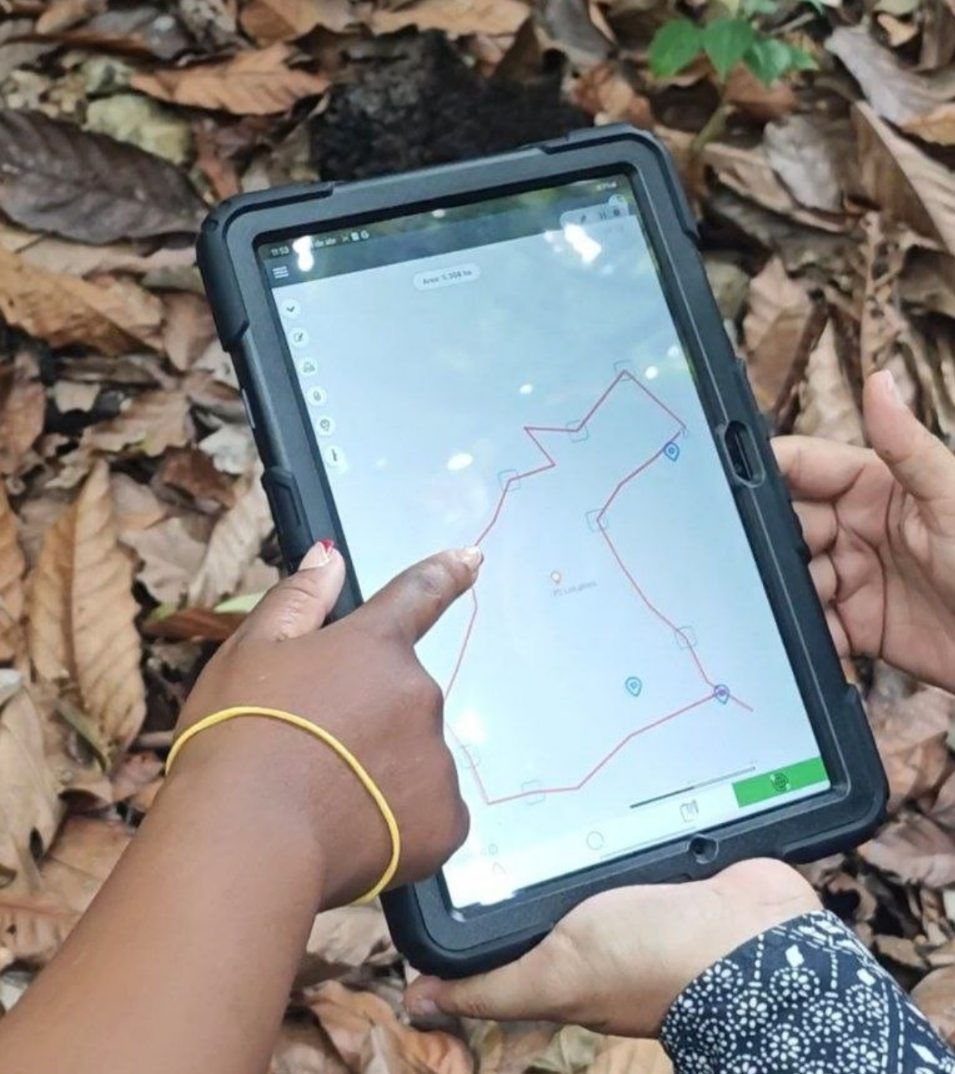
Ideally, the plot is mapped directly in the field, walking its boundaries with the GPS of a phone or tablet, and the polygon is linked to the producer from the very start. That way you get the real area, overlaps with neighbouring plots show up straight away, and nobody has to copy coordinates by hand from one file to another.
Spreadsheets fail more often than we think. Researcher Raymond Panko, who has studied the subject for decades, compiled audits of real-world spreadsheets and found errors in at least 86% of the spreadsheets examined in the more recent studies, with cell error rates of roughly 1% to 2.5%.
In an ICS, that kind of error might be a wrongly summed area, an estimated yield that doesn’t match the harvest delivered, or a badly applied filter that “hides” several producers. The worst part: the file gives no warning. The error looks like valid data.

The spreadsheet says “inspection carried out on 12/05”. But the signed form is in a paper folder, the photos are in the inspector’s WhatsApp, and the corrective action is in an email. It all exists, but none of it is connected.
In an ICS in Excel, the evidence usually lives outside the spreadsheet: at best, a column with a file name or a note like “photos in the May folder”. That works as long as the person who wrote it is still on the team and remembers where they saved it.
The regulation requires internal inspection reports signed by the ICS inspector and the inspected member. When the auditor picks a producer at random, what counts is being able to show the data and its evidence together, without having to reconstruct the story. That’s why every photo, questionnaire and signature should be saved in the same inspection record, at the moment it’s taken.
Who changed the area of this plot? When? Why? In a file shared by email or in a common folder, there’s usually no way to know. And anyone with access can delete a row by mistake.
Add to that a very real risk in small groups: knowledge concentrated in one person. If the ICS manager who “understands the Excel” leaves, the logic behind the columns, formulas and shortcuts leaves with them. An ICS should keep working when people change.
A “remarks” column isn’t a non-conformity management system. In Excel it’s easy to note a finding, but nothing reminds you of the deadline, assigns an owner, or stops a case from being closed without evidence.
In practice, every non-conformity should have a specific corrective action, a clear status (pending, in progress, resolved) and a review date. And when the inspector goes back to the plot, they should be able to check in the field whether the measure has been applied and attach the evidence, a photo or a comment, to that same case.
As we covered in our organic audit checklist, the auditor wants to see the full cycle: finding → action → owner → deadline → evidence → closure. If that cycle depends on one person’s memory, sooner or later something stays open.

Every time data is copied by hand from a paper form into Excel, or from one spreadsheet into another, there’s a new chance for error. And files have limits, too.
A well-known example: in October 2020, health authorities in England failed to report nearly 16,000 positive COVID-19 cases because they were using an old Excel format (XLS) that only holds around 65,000 rows. The data that didn’t fit was simply dropped, with no warning. You don’t need that volume to have problems — one bad import or a shifted column is enough.
Not necessarily. Excel is still very useful for one-off analysis, reports, or exploring data. The mistake is using it as the system: producer database, inspection log, non-conformity tracker and evidence archive all at once.
An Internal Control System needs exactly what a spreadsheet doesn’t provide on its own: a single source of truth, data validated on entry, evidence linked to each record, deadline follow-up, and a history of who did what.
abunda+ was built precisely to close that gap. The platform lets cooperatives and producer groups manage in one place their producers, production units and georeferenced plots, internal inspections with their questionnaires, photos and evidence, and risks and non-conformities with their follow-up.
Instead of hunting for “the right file”, the team always works on the same data, inspectors record information directly in the field, and when the audit comes, the ICS can show its work in minutes. See how real groups have done it in our ICS digitization use cases.
And best of all: you don’t have to start from scratch. The data you already have in Excel is the starting point for the migration.
Open your ICS in Excel today and look for three things: a duplicate producer, a coordinate that doesn’t make sense, and a non-conformity with no closing date. If you find any of them in under ten minutes, your ICS has room to improve.
Want to see what your ICS would look like in abunda+, built from your current data? Request a demo of the platform.